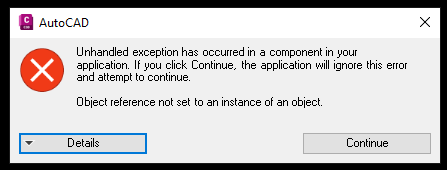
When a JIT Message appears, it is best to take screenshots as well as the exact text output the JIT provides. Here's an example:
JIT Message Dialog: Click on Details
Expanded with Details
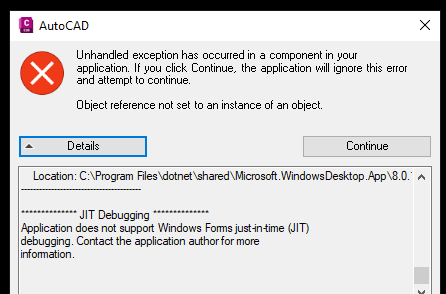
In the text box that says JIT Debugging, please click in this text box and select all the text. Use CTRL C to copy. Include in your message to properly report the issue.
Example of copy:
Application does not support just-in-time (JIT)
debugging. See the end of this message for details.
************** Exception Text **************
System.IO.FileNotFoundException: Could not load file or assembly 'RTCL_Logger, Version=1.0.0.0, Culture=neutral, PublicKeyToken=null'. The system cannot find the file specified.
File name: 'RTCL_Logger, Version=1.0.0.0, Culture=neutral, PublicKeyToken=null'
at PipeNetworkTools.PipeNetworkToolsCommands.RenamePartsCommand()
at Autodesk.AutoCAD.Runtime.CommandClass.InvokeWorker(MethodInfo mi, Object commandObject, Boolean bLispFunction)
at Autodesk.AutoCAD.Runtime.CommandClass.InvokeWorkerWithExceptionFilter(MethodInfo mi, Object commandObject, Boolean bLispFunction)
at Autodesk.AutoCAD.Runtime.CommandClass.Invoke(MethodInfo mi, Boolean bLispFunction)
at Autodesk.AutoCAD.Runtime.CommandClass.CommandThunk.Invoke()
Was this article helpful?
That’s Great!
Thank you for your feedback
Sorry! We couldn't be helpful
Thank you for your feedback
Feedback sent
We appreciate your effort and will try to fix the article